
Instagram IP bans can disrupt access to the platform without warning. This guide covers the reasons behind IP bans, how to identify them, what Instagram’s policies say, and practical methods for regaining access. The information here includes recommended VPNs and proxy services with pricing details for 2025.
Common Causes of Instagram IP Bans
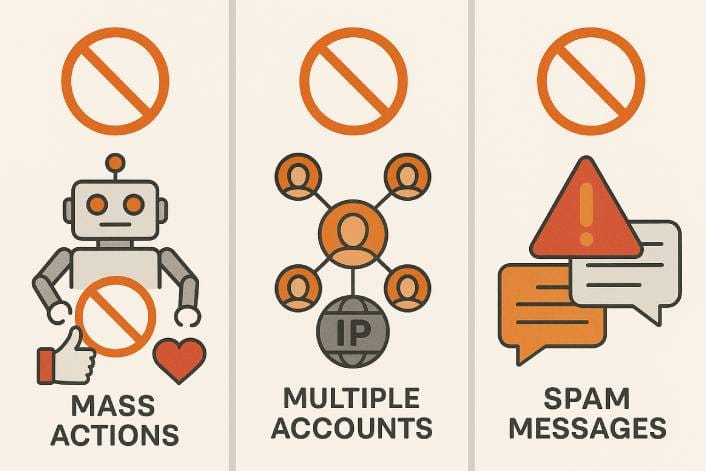
Instagram blocks IP addresses when it detects behavior that violates platform rules. Third-party automation tools like Jarvee or similar bot software can result in an IP ban, as Instagram detects bot-like patterns such as rapid, simultaneous actions like mass follows or likes executed within seconds. Performing too many actions in a short window also raises red flags, including mass liking, bulk commenting, or sending repetitive DMs. Creating multiple accounts solely for promotional content can produce the same outcome.
Logging into numerous accounts from a single network appears suspicious. While Instagram permits a few accounts, dozens of logins on one IP, especially when performing similar actions, may trigger a ban. This affects shared networks like offices or households where multiple users share Wi-Fi. Posting content that breaches Community Guidelines can escalate to IP blocks, including nudity, sexual content, hate speech, graphic violence, or prohibited material.
Scripts or software that scrape profile data or images violate Instagram’s terms of service. Aggressive web scraping or API abuse from a specific IP address gets detected and leads to bans. Rapid IP or location changes can also flag an account as a scraping bot.
How to Detect an Instagram IP Ban
Instagram does not send explicit notifications about IP bans. Instead, the restriction must be inferred from access issues.
- Unable to Load Feeds or Content: When the Instagram feed stops loading despite a stable internet connection, something is wrong. Error messages like “Couldn’t refresh feed” or “Try again later” appear when attempting basic actions.
- General Login Problems: Correct credentials fail to grant access on the affected network. The app may continuously display the login screen or show error messages after each attempt. Switching to a different network, such as mobile data, and successfully logging in indicates the original IP has been banned.
- All Accounts Affected: When multiple Instagram accounts cannot be accessed on the same network, an IP ban is likely. “Action Blocked” pop-ups or failures across different profiles on the same Wi-Fi confirm this. An IP ban covers every account using that connection, not just one.
- Open Proxy Warning: A specific error message sometimes confirms the ban: “The IP address you are using has been flagged as an open proxy.” This indicates Instagram believes the IP is associated with proxy activity or malicious behavior.
- Website and New Account Issues: On browsers, instagram.com may fail to load entirely on the banned network. The sign-up process for new accounts may also error out consistently from that IP.
Quick Test: Try accessing Instagram from a different internet connection. Switch to mobile data or use a VPN. If Instagram works there but not on the original network, the IP was likely banned.
How to Bypass an Instagram IP Ban
Several methods exist for regaining access after discovering an IP ban.
- Restart the Router or Change Networks: Most home internet connections use dynamic IP addresses. Rebooting the router can fetch a new IP from the ISP, instantly bypassing the ban. Alternatively, connecting to a different network like a mobile hotspot or public Wi-Fi tests whether the ban is IP-specific.
- Switch to Mobile Data: Cellular data connections provide a different IP separate from Wi-Fi. Mobile networks often use rotating or shared IPs that are less likely to be flagged. This works as a quick workaround for pure IP blocks.
- Use a VPN: A VPN routes connections through servers in different locations, providing a new IP address. However, many VPN services use data-center IP ranges that Instagram recognizes and blacklists. Free proxy servers or popular VPNs might not work if their IPs have been abused by others.
- Use Residential or Mobile Proxies: Residential proxies route traffic through real devices and IPs provided by ISPs, making connections appear like normal user traffic. Mobile proxies use 4G mobile IP addresses. When comparing mobile proxies and residential proxies, both are harder for Instagram to detect compared to standard VPNs and carry a lower ban risk than free proxies.
- Clear Cookies and Cache: Clearing browser cookies, cache, or Instagram app data removes session data that might interfere with access after changing IP addresses.
- Contact Instagram Support: The Help Center or in-app “Report a Problem” option allows appeals for wrongly blocked IPs. Being polite and honest about any errors increases the chance of a successful appeal.
- Wait It Out: Many IP bans are temporary, lasting 24-48 hours for minor infractions. Avoiding repeated login attempts during this period prevents extensions. Temporary bans typically lift within a week.
Recommended Tools and VPNs for Bypassing IP Bans
Several VPN services and proxy tools help bypass and prevent Instagram IP bans. Each option has different strengths, limitations, and pricing.
NordVPN
A large network of 8,400+ servers worldwide provides fast speeds and strong security with a no-logs policy. The variety of servers means less likelihood of all IPs being flagged. Some popular server IPs might be known to Instagram, and connections can be inconsistent on crowded servers. Monthly pricing runs approximately $12.99, dropping to $2.99-$4.59 per month on long-term plans.
Surfshark
Budget-friendly long-term pricing with unlimited simultaneous device connections makes this an attractive option. The IP pool is less oversubscribed than some larger VPNs. Being affordable means more users share servers, occasionally resulting in flagged IPs. Monthly costs are around $12.95, dropping to $2-$3 per month on two-year deals.
ProtonVPN
A strong privacy focus from a Swiss-based company with a no-logs policy. A free plan with limited servers provides a quick IP ban test. Paid plans include secure core routing. The smaller server network means IPs are not as commonly banned. The free tier costs nothing but offers slower speeds with limited locations. Premium plans run approximately $9.99 per month or $5 per month on two-year plans.
Decodo Residential Proxies
Millions of real residential IPs make traffic appear like ordinary user activity from various locations. Rotating residential IPs or sticky sessions are available. Pricing is based on bandwidth usage, which can become expensive with heavy media consumption. Plans typically start around $75 per month for a few gigabytes of traffic. Check out the best residential proxy providers for more options.
Mobile Proxy Services
Routing through real mobile 3G/4G networks provides the highest trust score with Instagram. Mobile proxies have the lowest ban rate because carriers rotate addresses and NAT many users. These services are costly, roughly $50+ per month per proxy with bandwidth limits.
ISP/Static Proxies
Providers like Proxy-Seller or IPRoyal offer ISP proxies, which are datacenter IPs legally issued by internet service providers. These behave like residential IPs but with datacenter stability. Pricing generally runs $2-$3 per proxy per month.
Mobile Hotspot Tethering
Using a smartphone data plan provides a different IP via the carrier at no additional cost beyond existing data usage. This leverages the mobile IP advantage without requiring separate proxy subscriptions.
VPN vs Proxy: Quick Comparison
Instagram’s systems are better at detecting data-center VPN IPs, but VPNs remain user-friendly for basic access needs. Proxies, especially residential and mobile types, are harder to detect but require more setup and charge by usage. For more details on choosing between a VPN or a proxy, consider your specific use case and budget.
For a single personal account, a reputable VPN from a top provider typically suffices to bypass an IP ban. For multiple accounts or automation, residential proxies or specialized Instagram proxy providers offer more reliable, ban-resistant solutions.
Wrap Up
Instagram IP bans happen when the platform detects suspicious activity, policy violations, or automated behavior. While the platform does not explicitly confirm IP bans, the signs are recognizable: failed logins, blocked feeds, and issues across all accounts on a network.
Bypassing a ban involves changing the IP address through router restarts, mobile data, VPNs, or proxies. Residential and mobile proxies offer the lowest detection rates, while VPNs provide an accessible solution for casual users.
The most effective long-term strategy combines using clean IPs with moderate, human-like behavior on the platform. Avoiding automation, respecting rate limits, and staying within Community Guidelines prevents future bans and maintains consistent access to Instagram.