
In the world of cloud computing, cost optimization is a constant priority. With pay-as-you-go pricing models, every CPU cycle, gigabyte of storage, and network packet has a price tag. Teams are under pressure to trim the fat, and a quick look at the monthly cloud bill often reveals what seems like low-hanging fruit.
These decisions, made with the best of intentions to control spending, can have dangerous, unintended consequences. In the rush to achieve “quick savings,” organizations often inadvertently dismantle the very security controls that protect their most valuable assets. The trade-off is not just about cost versus performance. It is a high-stakes gamble of cost versus risk.
The money saved by disabling a security feature is insignificant compared to the potential cost of a data breach. Understanding how these seemingly harmless financial decisions weaken your security posture is the first step toward finding a sustainable balance between an optimized budget and a resilient defense.
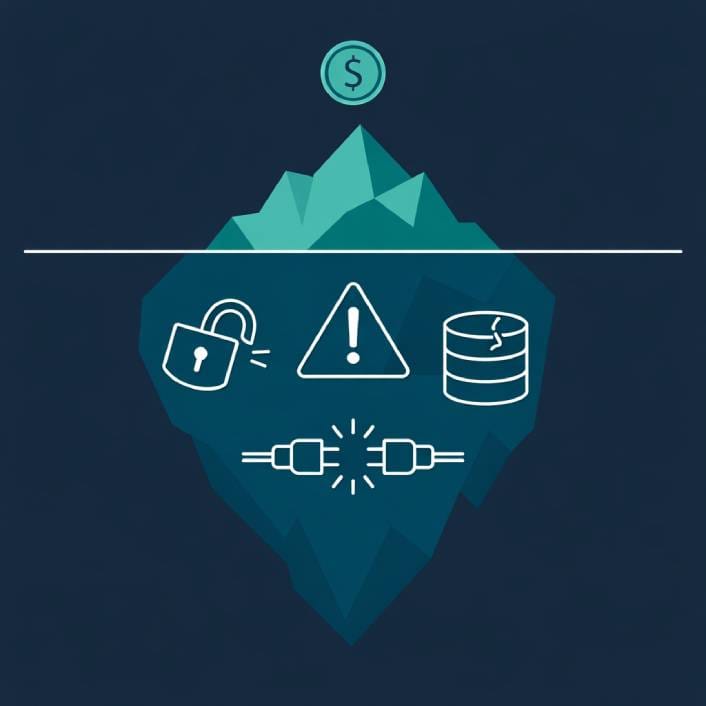
The Hidden Security Cost of “Quick Savings”
The pressure to reduce cloud spend often leads to a series of tactical, short-sighted decisions that create long-term security vulnerabilities. These changes are rarely malicious. They are the result of finance-driven goals colliding with a lack of security context, often opening the door to common cloud security threats.
Quick Reference Comparison Table
| Cost-Saving Action | Perceived Benefit | Hidden Security Cost |
|---|---|---|
| Reducing log retention | Lower storage costs | No historical data for breach investigations |
| Deleting inactive IAM roles | Cleaner account, fewer resources | Loss of emergency “break-glass” access |
| Downgrading instance types | Lower compute costs | Security agents may fail silently |
| Moving data to cold storage | Reduced storage fees | Slower retrieval during investigations, potential access control gaps |
Cutting Logging and Monitoring
One of the first things on the chopping block is often logging and monitoring. Advanced logging services can be expensive, and to a non-technical stakeholder, they can look like a luxury. A team might decide to reduce the log retention period from a year to 30 days or switch from a feature-rich security monitoring tool to a basic, free alternative.
The savings might look good on paper, but this approach blinds the security team. When an incident occurs, there is no historical data to investigate how the attacker got in, what they accessed, and how to prevent it from happening again. A recent report on data breach costs found that the longer it takes to identify and contain a breach, the more expensive it becomes. This underscores why timely threat detection is so critical and why robust logging is an investment, not an expense.
Deleting “Unused” Resources
Another common cost-cutting measure is to get rid of “unused” resources. An automated script might flag a security group or an IAM role that has not been active recently and mark it for deletion. However, that role might be a critical “break-glass” account designed for emergency incident response.
Deleting it saves pennies but could cripple the ability to respond to a major outage or attack. Similarly, downgrading instance types to save money might mean that a security agent or monitoring tool running on that instance no longer has enough CPU or memory to function correctly, effectively disabling it without anyone noticing.
Changing Data Storage Tiers
Even decisions about data storage can have security repercussions. Moving data from more expensive, high-availability storage to cheaper, “cold” storage tiers can be a smart financial move. But these colder tiers often have different access control models and longer retrieval times.
If this move is done without updating the corresponding security policies, the data might inadvertently become more accessible than intended or become impossible to retrieve quickly during a security investigation.
The Miscalculation: Short-Term Savings vs. Long-Term Breach Costs
The fundamental error in these cost-cutting exercises is a failure to properly calculate risk. The “savings” from turning off a security tool are immediate, tangible, and easy to report. The “cost” of the increased risk, however, is abstract and uncertain until it becomes a reality.
A single data breach can have devastating financial consequences that dwarf any savings achieved from trimming the security budget. These costs go far beyond the immediate technical remediation. They include regulatory fines (which can be astronomical under regulations like GDPR), legal fees, customer notification costs, and credit monitoring services for affected individuals.
The damage to brand and reputation can be even more costly. Lost customer trust is difficult to quantify but can have a long-lasting impact on revenue and market position. The operational cost of diverting an entire engineering team to deal with a breach, instead of building new features, can set a product roadmap back by months.
When viewed through this lens, the few thousand dollars saved by disabling a logging service seems like a catastrophic miscalculation.
Balancing the Budget Without Sacrificing Security
Controlling cloud costs and maintaining a strong security posture do not have to be mutually exclusive goals. This requires a more strategic, collaborative approach that moves beyond knee-jerk cuts.
Involve Security in FinOps Discussions
The practice of FinOps, which brings financial accountability to cloud spending, needs to have security as a key stakeholder. Before any cost-saving change is made, the security team should be consulted to assess its potential impact.
A security engineer can explain why a specific logging tool is critical for compliance or why a particular IAM role, despite being inactive, is a vital part of the incident response plan. This collaboration turns cost optimization from a blunt instrument into a precision tool.
Focus on Eliminating True Waste
Instead of cutting security features, focus on genuine waste. This includes “zombie” resources (like unattached storage volumes or idle virtual machines) that provide no value. It also means right-sizing instances based on actual performance data, not guesswork.
Modern cloud security posture management tools can help identify these inefficiencies without impacting security controls.
Adopt a Risk-Based Approach to Optimization
Not all assets are created equal. The most critical, internet-facing applications that handle sensitive data require the highest level of security and monitoring. This is not the place to cut corners.
Less critical internal applications or development environments might be able to tolerate a lower level of security investment. By working with the business to classify applications based on risk, the security budget can be allocated more intelligently. This means investing heavily where it matters most and finding safe savings elsewhere.
Reputable sources like the Cloud Security Alliance offer frameworks for assessing risk in cloud environments.
A Smart Investment, Not an Unnecessary Cost
Security is not an expense to be minimized. It is an investment in business resilience. The cloud offers incredible power and flexibility, but it also demands a disciplined approach to management.
By fostering collaboration between finance, operations, and security teams, organizations can build a culture where cost-saving decisions are made with a full understanding of their security implications. This ensures that when trimming the cloud bill, teams are cutting fat and not severing an artery.